
Stop Guessing: Why an Amazon Listing Photo Service is Your Highest-ROI Investment
An Amazon listing photo service isn't about getting "pretty pictures." It's about engineering a visual sales argument. A true service combines high-end photography, data-driven graphic design, and an obsessive focus on buyer psychology to create assets that drive clicks, conversions, and profit.
Think of your images as your top salesperson. They work 24/7 on the most crowded digital shelf in the world. Treating them as a creative expense is a foundational business error. They are a core growth investment.
Your Images Are a Profit Leak
Let's be blunt: your product images are likely the weakest link in your Amazon business.
It doesn't matter how much you spend on PPC, how perfect your keyword strategy is, or how many five-star reviews you have. If your main image doesn't command a click in search results and your supporting images don't build an immediate case for purchase, you are bleeding sales. Every single day.
This isn't about aesthetics. It's about engineering conversion. On Amazon, images sell first, copy sells second. They are the single biggest lever you can pull to improve performance, yet most sellers treat them as a low-priority checkbox.
The Myth of "Good Enough" Photos
The "good enough" mindset is a poison pill for Amazon brands. Whether it's DIY photos or cheap freelancer shots, this approach completely ignores the brutal reality of the marketplace.
Shoppers make subconscious judgments in milliseconds. A listing with blurry, uninspired, or confusing images is an instant signal of a low-quality product and an untrustworthy brand. It tells the buyer you don't care enough to invest in your own business.
The consequence of mediocre images isn't just a poor conversion rate. It's a cascade of performance issues that systematically drains profit from your entire operation.
When your main image fails to grab attention, your click-through rate (CTR) plummets. This signals to Amazon's algorithm that your listing is irrelevant, causing your organic rank to slide. The predictable result? You're forced to overspend on PPC just to maintain visibility, driving your ACoS through the roof.
From Creative Expense to Force Multiplier
Viewing an Amazon listing photo service as a cost is a strategic failure. A professional service doesn't just take pictures; they conduct the research required to turn your images into a force multiplier for your business.
- PPC Efficiency: A high-impact main image drives a higher CTR on your ads, which improves your ad quality score and can lower your cost-per-click. Better images make your ad dollars work harder.
- Conversion Rate (CVR): A strategic image stack anticipates and answers buyer questions, demolishes objections, and visually demonstrates value. This directly increases your unit session percentage.
- Price Elasticity: Premium visuals create perceived value. This allows you to command a higher price than competitors whose listings look cheap and untrustworthy.
Your images are doing the heavy lifting long before a customer reads a single bullet point. Investing in a professional service isn't about making your product look good; it's about making it sell better.
Deconstructing the 7-Image Sales Funnel
A high-converting Amazon listing isn't a random collection of photos. It's a deliberate visual sales pitch. Each of the seven primary image slots has a specific job. When they work in concert, they guide a shopper from a casual scroll to a confident purchase.
This isn't about meeting Amazon's technical requirements—that's the bare minimum. This is about using each image to answer a buyer's unspoken questions, neutralize their doubts, and build an airtight case for why your product is the only logical choice.
Get this wrong, and the consequences are immediate. Weak images don't just look unprofessional; they actively harm your business.
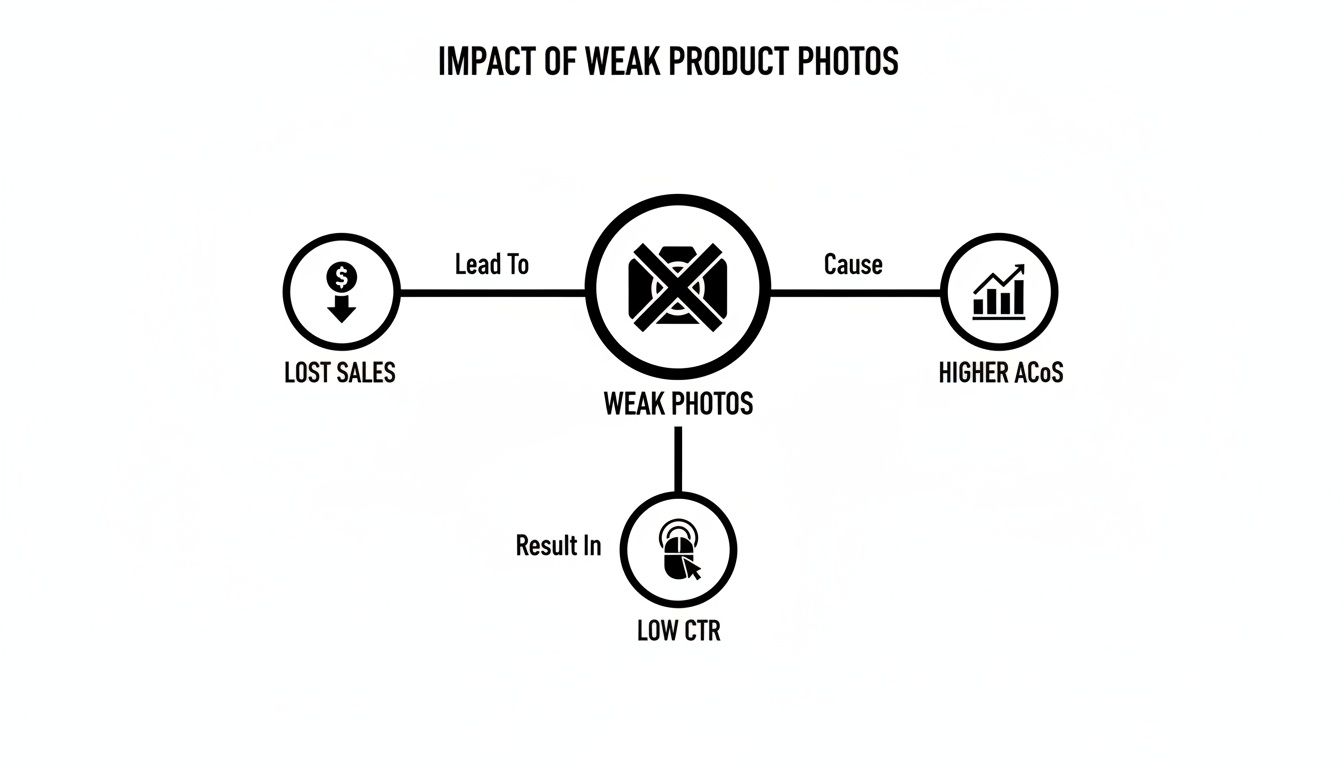
As the diagram shows, poor photos are a direct leak in your sales funnel, driving up ad spend and destroying your click-through rates.
The Strategic Role of Each Image Slot
To fix the leak, you must understand the strategic purpose of each image. This is a visual funnel. It's not about what you want to show; it's about what the customer needs to see to make a decision.
This table breaks down the function and conversion goal for each of the seven primary image slots.
| Image Slot | Primary Function | Conversion Goal |
|---|---|---|
| Image 1: Hero | Stop the scroll and earn the click from search results. | Maximize Click-Through Rate (CTR) |
| Image 2: Infographic | Highlight a key feature that solves a customer pain point. | Communicate Value & Differentiate |
| Image 3: Infographic | Showcase a secondary benefit or unique selling proposition. | Build a Deeper Case for Quality |
| Image 4: Lifestyle | Help the shopper visualize the product in their own life. | Create an Emotional Connection |
| Image 5: Lifestyle | Reinforce the aspirational outcome or result of using the product. | Build Desire and Justify Price |
| Image 6: Comparison | Position your product as the superior choice against competitors. | Overcome Objections & Close the Sale |
| Image 7: Detail/Trust | Show quality, scale, or provide a final piece of reassurance. | Remove Final Doubts & Build Confidence |
By treating your image stack as a deliberate, step-by-step argument, you transform it from a passive gallery into an active conversion machine.
The 7-Image Funnel, Deconstructed
Here's how a professional Amazon listing photo service executes each stage of this visual funnel.
1. The Hero Image: The Scroll Stopper This is your most valuable asset. Its only job is to get the click from a chaotic search results page. It must be perfectly lit, crisp, and dominate its pure white background. The goal isn't just to follow Amazon's rules, but to look so professionally superior to the competition that the shopper’s thumb is forced to stop.
2. Infographic Callouts: The Problem Solvers Once clicked, the buyer asks, "What's in it for me?" These images must provide an instant answer. Use bold, scannable text and clear iconography to demonstrate how your key features solve their primary pain points. This isn't a list of specs; it's a visual showcase of solutions.
3. Lifestyle Shots: The Emotional Bridge This is where you sell the outcome, not the object. Effective lifestyle images place your product in an aspirational but relatable context, helping shoppers envision themselves using it and experiencing the benefits. This shifts the purchase decision from purely logical to emotional.
4. Comparison Chart: The Decision Clincher At this stage, the shopper is actively comparing you to alternatives. A simple, clear comparison chart that frames your product as the obvious, superior choice is invaluable. Show them exactly why you're better than "Other Brands." This is where you neutralize the competition.
5. Scale/Detail Shot: The Final Reassurance Your final images must eliminate any lingering doubt. This could be a "what's in the box" shot, an image showing the product’s size relative to a common object, or a macro shot of premium materials. Its job is to build final confidence before the add-to-cart click.
The Research Framework That Guarantees ROI
Elite Amazon photo services don't start with a camera; they start with data. Commissioning a photoshoot without a data-backed strategy is the fastest way to get beautiful images that fail to sell.
The difference between a high-performing image stack and an expensive gallery of failures is the pre-production research. This process turns photography from a subjective art into a calculated science. It ensures every shot is engineered to crush a specific buyer objection, highlight a critical benefit, or counter a competitor’s weakness.
The output is an airtight creative brief that guarantees your final images speak directly to your target customer's needs and motivations.

Step 1: Deconstruct Competitor Visuals
Begin with a surgical teardown of the top three to five listings for your primary keyword. The goal is not to copy. It's to identify their visual strategy, expose their weaknesses, and find the gaps your images can exploit.
Analyze their entire image stack, asking critical questions:
- Hero Image Strategy: What are they using to stop the scroll? A clean product shot, a 3D render, product-in-packaging? How does it perform visually in a compressed search result?
- Benefit Hierarchy: What benefits are they highlighting in their infographics? Are they pushing durability, ease of use, or a specific technical feature? This reveals what they believe is most important to the customer.
- Lifestyle Narrative: Who is using the product in their lifestyle shots? What is the environment? This uncovers their target demographic and the emotional outcome they are selling.
- Visual Weaknesses: Where are the gaps? Do their lifestyle shots look like cheap stock photos? Is their infographic text unreadable on mobile? Are they failing to show the product's actual size and scale?
Every weakness is an opportunity. If their infographics are cluttered, yours will be clean. If their lifestyle photos are fake, yours will be authentic.
Step 2: Mine Reviews for Objections and Pain Points
Your best creative direction will come directly from customer feedback. Reviews—specifically the 3-star reviews—are a goldmine of objections, frustrations, and unmet expectations that your images must proactively solve.
Ignore 5-star reviews; they are mostly emotional validation. The actionable intelligence is in the 3-star "it's okay, but..." feedback. This is where customers detail the friction points your images must address.
Filter the reviews for your top competitors and look for repeating themes. Do customers repeatedly complain that the product is smaller than expected? A clear scale shot is now mandatory. Do they find it difficult to assemble? An image showing a simple 3-step setup becomes non-negotiable.
Scan for phrases like:
- "I wish I had known..."
- "It was much smaller than I thought..."
- "I had trouble with the..."
- "The color wasn't accurate..."
Each phrase is a direct instruction for a photograph. By mining these pain points, you create images that answer questions before they are asked, building trust and reducing purchase friction.
Step 3: Align Infographics with Search Intent
The final piece of the research puzzle is understanding the precise language customers use to search. This data reveals which benefits and features are top-of-mind and should therefore be featured prominently in your infographics.
If search data shows high volume for "lightweight travel yoga mat," your infographic text cannot simply state "durable material." It must scream "Ultra-Lightweight & Packable" in bold, benefit-driven copy. Your images must visually deliver on the promises made in your title and backend keywords.
This process ensures your visuals are not just aesthetically pleasing but are hyper-relevant to the search intent that brought the customer to your listing. By combining competitor analysis, review mining, and search data, you build an evidence-based creative brief. This is how a professional Amazon listing photo service moves from taking pictures to engineering conversion assets that deliver measurable ROI. You can find more strategies for optimizing your visual assets on the AZ Prodshots blog.
How to Vet and Select the Right Photo Service
Choosing the wrong Amazon photo service is an expensive, time-consuming mistake. The cost isn't just the fee for the photos; it's the months of lost sales from an underperforming listing. You need a strategic partner, not just a photographer with a nice camera.
Look past the portfolio. Anyone can showcase their best work. What matters is a repeatable, data-driven process that consistently produces results. You are looking for a service that solves business problems with images.
Beyond the Portfolio: Questions That Reveal Strategy
Your questions during the vetting process must force them to reveal their strategic thinking. Dig into their process, not just their final product.
These questions separate the strategists from the order-takers:
- "Walk me through your research and discovery process before the shoot." If they start talking about lighting or camera gear, it's a red flag. A true professional will immediately discuss competitor analysis, review mining, and defining the customer avatar.
- "How do you determine the hierarchy of features and benefits for the infographics?" A weak answer is, "You tell us what's important." A strong answer is, "We analyze customer reviews and search data to identify the key selling points that overcome the most common purchase objections."
- "How do you ensure our images comply with Amazon's current and future technical requirements?" Amazon's TOS is a moving target. A professional service will have a clear process for staying on top of technical specs and content policies to ensure your images are never suppressed.
These questions reveal whether you’re hiring a proactive strategist or a reactive photographer. You're paying for their strategic insight, not just their technical skill. The impact of this strategic approach is clear in case studies like this Clever Photographer case study, which demonstrates what a truly optimized image stack can achieve.
Understanding Pricing Models
Pricing for an Amazon listing photo service typically falls into three categories. Understanding them is key to making an apples-to-apples comparison.
- Per-Image Pricing: Simple on the surface, but costs can escalate quickly. Infographics, lifestyle shots, and model fees are almost always extra, making the final bill unpredictable.
- Day Rate: Common for commercial photography but a poor fit for Amazon sellers. You pay for the photographer's time, not for a complete, strategic set of listing images. It rarely aligns with the specific needs of an Amazon product detail page.
- All-Inclusive Packages: The standard for professional Amazon services for a reason. You receive a full, conversion-focused image stack (typically 7-9 images) for a single, fixed price. This model aligns the goals of both the seller and the service provider.
Regardless of the pricing model, some deliverables are non-negotiable.
A professional Amazon photo service must deliver images that are fully edited, retouched, and formatted to Amazon's exact specifications. You should never be handed raw files and left to figure out the rest.
Your final delivery must include high-resolution JPEGs, at least 2000x2000 pixels, in the sRGB color profile. Anything less indicates a fundamental lack of understanding of Amazon's technical requirements for features like image zoom. See what a complete, research-driven process entails by reviewing our approach to creating high-converting Amazon images.
A true partner delivers a finished, upload-ready asset, not a project that creates more work for you.
The Pre-Shoot Success Checklist
The quality of your final images is determined by the quality of your preparation. An unprepared photoshoot is the fastest way to waste money and get mediocre results. Even the best amazon listing photo service is limited by the strategy and materials you provide.
A clear pre-production checklist eliminates costly delays and ensures every dollar spent on photography is maximized. This isn’t administrative work; it’s the foundation for success.
Prepare and Ship Pristine Product Samples
Your product samples are the star of the show. Sending dirty, damaged, or incomplete products is a rookie mistake that compromises the entire project. High-resolution cameras and professional lighting will magnify every flaw.
Take the time to select and prepare perfect, retail-ready samples.
- Send Multiples: Always ship at least two to three units. This allows for one to be used in action shots, one to be potentially deconstructed for feature callouts, and one to remain pristine for hero images.
- Include All Packaging: Ship the products in their final retail packaging. This is critical for building brand trust and showcasing the unboxing experience.
- Inspect and Clean: Wear gloves to avoid fingerprints. Meticulously clean and polish each unit before packing it securely for transit.
Compile Research into an Actionable Creative Brief
The creative brief is the most critical document in the entire process. It translates your data-driven research into clear, direct instructions for the creative team, bridging the gap between business objectives and creative execution.
A strong brief is concise and visual. It must include:
- Competitor Analysis: Screenshots of top competitors' best and worst images, with brief notes explaining what works, what fails, and how your brand will visually differentiate.
- Review Insights: The top 3-5 customer pain points and desired benefits identified during review mining, each tied to a specific photo concept designed to address it.
- Brand Guidelines: Your logo, brand colors, and fonts. Clearly define any visual "must-haves" or "must-avoids" to ensure brand consistency.
Define a Precise Shot List
Finally, create a detailed shot list. This is not a vague suggestion; it's a concrete plan for every image. For each of your seven to nine image slots, define its purpose, the required angle, key features to highlight, and any text callouts for infographics.
A detailed shot list is your insurance policy. It eliminates guesswork and ensures the photography team is capturing what your research proves will drive sales—not just what they think looks aesthetically pleasing.
Data shows that listings using all available image slots see a significant lift in conversion, influencing 65-70% of buying decisions. For a deeper dive on listing optimization, check out the insights on NovaData.io.
By following this checklist, you position yourself as a strategic partner, enabling your chosen amazon listing photo service to deliver exceptional results. When you're ready, you can start your data-driven image project here.
Measuring the ROI of Your New Images
The success of your new images is not subjective. It is measured in data. Investing in a strategic amazon listing photo service is pointless if you cannot prove the return.
The process is simple but requires discipline. Before uploading any new images, establish a clean performance baseline. Pull a report from Seller Central covering the 30-60 days immediately prior to the change. This is your "before" state.
Isolate the Variable, Track the Metrics
After the new images go live, track the same key metrics for the next 30-60 days. To get a clean reading, you must isolate the variable: do not change your price, copy, or PPC strategy during this testing period. The goal is to prove that the images alone drove the change in performance.
Focus on three core metrics:
- Unit Session Percentage (CVR): Your conversion rate. A strategic image stack that answers questions and builds trust will increase the percentage of visitors who purchase.
- Click-Through Rate (CTR): The measure of your main image's effectiveness. A higher CTR means your hero image is winning the click against competitors in search results.
- Total Sessions: Your traffic. While many factors influence sessions, a higher CTR is a positive signal to Amazon's algorithm, which can lead to increased visibility and more traffic over time.
Calculating the Financial Impact
Once the testing window is over, compare the "before" and "after" data. Even a small lift in conversion can have a dramatic impact on your bottom line.
A lift in Unit Session Percentage from 10% to 12% isn't a two-point gain; it's a 20% relative increase in conversions. For a product generating $10,000/month, that's an additional $2,000 in revenue, driven solely by the image investment.
This analysis reframes the entire expenditure. The photo service is no longer a one-time creative cost but a high-leverage profit driver. It provides definitive proof that strategic images are a sustained source of increased sales, improved ad efficiency, and higher profits.
Frequently Asked Questions
Direct answers to the most common questions from brand operators ready to invest seriously in their listing photography.
How Long Does a Professional Photoshoot Take?
A properly executed, research-driven project typically takes 2-3 weeks from product arrival at the studio to final image delivery. This timeline accommodates crucial steps: product prep, strategic planning, the shoot itself, and post-production, which includes retouching, formatting, and infographic design. A timeline faster than this is a red flag that they are cutting corners on strategy or quality control.
What If I'm Not Satisfied with the Images?
A reputable Amazon listing photo service will have a clearly defined revision policy in writing. Expect one or two rounds of reasonable revisions for minor post-production adjustments like infographic text or color correction.
Re-shoots are different. If the studio executed the approved creative brief correctly and you simply change your mind, expect to pay for additional studio time. This is why a detailed, data-driven creative brief is your best protection.
If the studio failed to follow the approved brief, a professional team will work to correct the error. A clear, upfront agreement is essential to protect both parties.
Can I Repurpose These Images for Other Marketing Channels?
Yes, but with a caveat. You will receive high-resolution final images that can be used for your DTC site, social media, or other marketing. This is an excellent way to maximize the value of your investment and maintain brand consistency.
However, remember that images engineered for Amazon conversion are built for a specific, high-intent environment. An infographic designed for a product detail page may be too direct for a brand-awareness Instagram campaign. The raw photography is a powerful asset, but it may need to be adapted for other channels. If you have multi-channel use in mind, get in touch with us before the project begins so we can plan accordingly.
Is a Professional Service Necessary For a Simple Product?
Yes. It's arguably more critical. For a simple product with few differentiating features, your visuals are doing nearly all the work of communicating quality, value, and trustworthiness. When a competitor's product is functionally identical, superior photography is how you justify a premium price and earn the customer's trust. Strategic imagery creates a powerful competitive advantage, especially in saturated categories. It's how you make a simple product the premium, obvious choice.